This post is based on my talk “Nuestro código habla” (in Spanish). I first gave it at Pamplona Software Crafters 2016, then at Codemotion and Madrid Agile, and finally at an online event with DesarrolloWeb.com. That last one is the recording. Eight years later I gave a sequel, Developing from a narrative perspective.
For the last few years, before joining Plain Concepts, I’ve been helping other companies improve their tests and their code: something like an agile transformation, but close to the keyboard. Every time they call you, it’s because something hurts. If everything were going well, nobody would call.
There are plenty of high-level talks out there. What I kept finding, though, was that we often fail at the basics. This post collects the things I see again and again that end up causing us pain.
One caveat before we start. You can write code in many contexts: the umpteenth JavaScript library, a product you sell, a SaaS. Most of what follows applies everywhere, but I’m thinking about applications with a strong business component. If you’re building an infrastructure library to connect to NoSQL databases, some of this advice won’t apply literally, and that’s fine.
Your next teammate
We often think the code is ours. It isn’t. It belongs to everyone on the team. And we hold a kind of conversation with it all the time: we read it and ask ourselves what it’s telling us, what on earth it means.
If what the code tells us annoys us sometimes, imagine it were your next teammate. Or the previous one.

This could be your next teammate.
That’s one reason to take care of these conversations. Another one is closer to home. How many times have you opened a piece of code nobody had touched in six months and thought “I’m not going in there”? If we had left it in a better state, it would tell us something now, instead of speaking Aramaic.
Your future self will thank you. How many times have you looked at a piece of code, wondered who wrote it, gone to the history to ask them… and found yourself? A year ago, three months ago, three days ago. There’s nobody to ask. You swallow your pride and admit you made a mess.
I like to say I’m a bit of a gardener of code. Code tends to grow organically, and if we don’t pay attention to it, it turns into weeds. We also tend to treat it as if it would last two days, when what we want is an application that lasts, not one we have to rewrite in six months.
So let’s go through the places where our code talks to us. Each one would deserve a post of its own, so some get more detail than others.
Structure
When you join a project, your entry point isn’t the code inside the files. It’s the file structure itself. Your code lives in files, inside folders, and that deserves care. Anyone new on the project who has to fix a bug or work on a feature needs to find their way around before they even open a file. Otherwise they’ll open folders at random, looking for something.
I once looked at a real open source project that had a folder called dns. Fine, I thought: everything related to DNS will be there. But no. Inside Exceptions there was a DNS exception. OK, they keep all the exceptions together. But inside Enumerations there was also a DNS class that defined the types of DNS records. So what’s inside the dns folder, then?
That happens when we mix infrastructure semantics and business semantics in the structure of our code. In an application whose purpose is a business, don’t mix them.
Say we’ve decided to structure by business. Domain-Driven Design talks about application services, domain services… services everywhere. If our application has orders, customers, a catalog, and some authentication, we could end up with this:
Services/
  AuthenticationService
  CatalogService
  CustomerService
  OrderService
The problem is that it’s opaque. I have to open the file to find out what I can actually do. And these services pile up dependencies. Suddenly OrderService has twenty methods and seven dependencies, and of those seven, three are used by three methods and another three by two other methods. Calling one method would only need one dependency, but you have to deal with all of them. That makes maintenance much harder.
One school of thought says: at least split commands from queries. That already helps you find your way: I want to work on a query, so I go to the query class.
Interaction-Driven Design goes one step further. Nobody charges us per class, and today’s file systems can handle all the files we need. So if your application has a rich domain, create one file for each business action that matters to you:
Customers/
  CreateCustomer
  ChangeCustomerAddress
Orders/
  PlaceOrder
  CancelOrder
When someone tells the new person on the team “there’s a bug when creating customers”, it’s easy: go to Customers and open CreateCustomer. Testing gets easier too, because each class has exactly the collaborators it needs. You don’t have to guess which collaborators a test needs, which ones to mock, and how. I’ve used this in a couple of projects and I recommend it.
APIs
Which application doesn’t have a public API these days? An API is a door into your business. Remember Gandalf in front of the gates of Moria, frustrated because he can’t remember how to say “friend”? Sometimes our APIs are like that. They’re there so that other people and other applications can talk to us, and they make that conversation hard.

Your API is a door into your business. Make sure people know how to open it.
There’s a lot to say about API design, but at the very least, an API shouldn’t surprise you. We all know the principle of least surprise, and then we forget about it. The surprises show up in the data, in the return codes, in the verbs. How often have you found a POST where there should be a GET?
Here’s a real example, fixed by now, luckily. An API processed jobs, and each job had a set of tasks. You asked for the status of job 1:
{
  "id": 1,
  "status": "Finished",
  "tasks": 30,
  "succeeded": 29,
  "failed": 1
}
If all 30 tasks failed, the status was Error. If 29 failed and one worked, the status was Finished. There was no state for a partial failure: anything short of total failure looked exactly like total success. That was very awkward to handle.
The same API had an endpoint for the detail of a job, /jobs/1/detail. That URL already makes little sense, since a GET of /jobs/1 should be enough. But if you wanted to know which tasks failed, the detail didn’t tell you. You had to call /tasks/1/errors.
In another API, a POST returned the new resource as id, and a PUT returned it as recordId. Same thing, two names.
These things happen because APIs grow organically too. You didn’t think about errors at the start, and when you need them you add a new endpoint, without stopping to think that you already had a detail endpoint.
Your UI isn’t your only client
Ask yourself: is the user interface the only client of your API? Are you completely sure it always will be? I can think of very few scenarios where the answer is yes.
We tend to model APIs around how the current interface will consume them. Up to a point, that’s fine. But when the shape of the data, or even the kind of calls, depends only on the screen you have today, you’re in trouble the day you build the mobile version or redesign the UI. You find that the API doesn’t let you, because it’s coupled to the interface. You didn’t design it to be consumed; you designed the call that suited you, because the grid component you were using swallowed the data perfectly in that format.
Documenting APIs and commenting code
Someone in the chat asked about documentation and comments. They’re two different things.
Documenting an API is worth it, but think about who will consume it, because documentation isn’t free. Weigh its cost against the benefit. If you’re writing a library other developers will use, open source or not, document it. Don’t ask them to read your implementation to find out what it does. Nobody will use it otherwise. Your language also matters: with static typing, tools like Swagger give you all the type information about the calls for free. You still write the descriptions, but the difference is huge. With dynamic languages Swagger helps too, just much less.
Comments in code are a different matter. I think code should be understandable without comments. But there are things code can’t tell you. Code tells you what it does, not why. In complex domains you sometimes need to write down the why. That’s very different from a comment above GetCustomerById that says “gets the customer by ID”. That comment adds nothing, costs money, and goes stale easily.
There are cases where you do need to document the implementation: a performance-critical piece, a hack around a browser bug, an encryption algorithm. I like the idea that needing to explain your implementation is a small failure as a developer, because you couldn’t write code that explains itself. It will happen, and when it does, document it. But distinguish between building something for other developers and building something your whole team works with every day.
Code
I once saw STUPID used as the opposite of SOLID: Singleton, Tight coupling, Untestability, Premature optimization, Indescriptive naming, Duplication. If we have to choose, please, let’s go for SOLID. Taking the SOLID principles to the extreme can cost too much energy, but there’s a very profitable middle ground between that and writing STUPID code.
If I had to keep two things from that list, they would be these.
Testability. Code that’s hard to test usually ends up tightly coupled, with poor cohesion, and with a lot of junk: over-optimized in some places and neglected in others. As soon as you make your code testable, you’re paying attention to SOLID whether you meant to or not.
Naming. When we’re talking about business, use business names.
Duplication is cheaper than the wrong abstraction
STUPID mentions duplication, but keep in mind a line from Sandi Metz that I find very useful: duplication is far cheaper than the wrong abstraction.
As developers, as soon as we see two places with very similar lines of code, we feel bad. We’re duplicating code! Let’s extract an abstraction, make it generic. When we talk about business, we should talk about duplicated business, not duplicated lines. At the start of a project the business is small, and code can look duplicated just by chance, because there’s very little of it. As the business grows and features come in, that “duplication” can turn into a toothache, because it was never duplicated business.
So think about duplicated purpose. What is this piece of code for? If the purpose is duplicated, fine. When you get to the third time, the rule of three, abstract it. If the purpose isn’t the same, it’s probably cheaper to keep the duplicated code. Nothing bad will happen. If you have the same thing repeated 200 times, look into why, but that’s another story.
Missing abstractions
There’s a tendency to work too much with primitive types, especially in dynamic languages. That’s not because dynamic languages are bad, far from it. But in business code, primitives tell you nothing.

Flying primitives: data everywhere, and nothing that tells you what it means.
The simple example I always use: I ask for the width and height of an image, and I get back a tuple. The first element is the width and the second the height. I’ll forget which is which in twenty seconds. Did I say width first? I’m not sure anymore. In Python, a namedtuple keeps the names, and I can ask for width and height.
Static typing doesn’t save you either. An ID is a string, period, until one day it causes problems.
The result is that my conversation with the code consists of going to the implementation of every method to see what it does. And with all the microservices around lately, the implementation might not even be in this repository.
DevOps is code too
We sometimes put on our scripting hat for DevOps and think we can be sloppy, because it’s just DevOps code. No. The same rules apply: it should be testable, and it should be well named.
That second part sounds strange, but it matters: we stop talking about business in our DevOps code. We’re tired of business by then, and we want things that smell technical, the kind we like. So we name things after the piece of infrastructure that solves the problem: the Postgres, the Rabbit, the Apache, the Mongo.
Give it a twist and keep speaking the business language. Instead of the Elasticsearch, the post search server. Instead of the Active Directory, the security service. Instead of the Mongo, the news storage service. Then, when something breaks, you don’t say “I have a problem with the Mongo” (which might not even be Mongo anymore). You say “I have a problem storing news”, and the whole conversation keeps talking about news, or whatever your business is.
We spend a lot of time translating instead of talking about what matters. The product owner says “product catalog”, inside the code we call it InventoryAssets, and when we talk to the infrastructure people it becomes “the thing in Postgres”. Keep the smell of business throughout. It’s what pays the bills.
Tests
Tests should talk about features. There’s no point in a test named after “feature 225”. You’ll change your issue tracker someday and then what, rename all your tests?
And describe the feature properly. Take a kata where characters can be healed. The test shouldn’t say that health increases when it’s 1000; it should say that a character can be healed, or that a character can’t be healed when it’s already at full health. Talk to me about the business.
That’s the message that runs through this whole post: use the language of the domain. It’s there for a reason, and it lets us understand each other. Don’t build dictionaries to translate from business to code and back.
Tests should also be readable and simple. A test with 500 lines is probably doing something wrong. An if and three nested loops inside a test is doing something wrong, for sure. I’m not a dogmatic person, but in cases like these there’s no doubt.
And remember DevOps code: it probably needs tests too. If your project is small and your pipeline is a few boxes clicked together in Jenkins, maybe not. As soon as your deployment gets complicated, you’ll have to pay attention to it.
Data
Data can be a headache. How many times have you named a field wrong, noticed when it was already in production, and decided to leave it, because another migration just to rename it… no way?
Then someone like me joins the project a year later: “In the code we call it customer, but I see a Users table and no Customers table.” “Well, at first they were users of the application.” “And we couldn’t migrate it?” “Ugh, a migration…”
Rare is the application that doesn’t work with data. Other times we’re not sure whether a piece of data is still used. Let me search the whole codebase. It’s saved here, but I don’t know if the UI reads it. After two years you have a table with 40 columns, and you don’t know whether 15 of them are used, because you didn’t remove them the moment you stopped using them. Or you denormalized something and ended up with a process to sync the copies, because you don’t even remember whether you need them and you’re afraid to change it.
When you’re afraid to change code, the conversation has gone sour. If you think your code will punch you when you talk to it, something is wrong.
Configuration is data too
It’s not only the data our users persist. There’s data about how the application should behave, connection strings, and lots of infrastructure settings it needs to run. The same thing happens there. You find a connection string to SQL Server named MongoConnectionString. Why? Because at some point we migrated from Mongo to SQL Server, or the other way round, and since the application read that key in several places, we changed the implementation but not the name.
Other times you find settings for a module that no longer exists. You deleted or replaced the module, but you were afraid to touch the configuration, so you kept adding, and adding, and adding.
A while ago I helped a client with a product they had been developing for ten years. They were lucky: it sold and it worked very well, and ten years of development is a success in my book. But they had neglected their configuration. They had around 800 keys, and they believed only 10 or 20% of them were still needed. Finding out which ones meant almost trial and error. It’s much easier to clean up little by little than to let the garbage pile up under the rug for months.
Migrating without the big bang
Someone in the audience was moving from relational databases to Firebase, where the data is much less structured and an entity can end up named one way in one place and another way elsewhere. How do you change that?
The first thing: always create an abstraction to access your data, so there’s a single access point for each piece of it. Every change becomes much easier, and if you change your persistence model tomorrow, you change the abstraction instead of every place that queried the database directly.
With that in place, there are many techniques, depending on your data volume, how often you read, how much you care about writes, and whether you can stop the system. One simple technique that has worked for me is to version your data. You don’t migrate millions of records at once, locking the database and making your users suffer. When the abstraction reads a record, it checks the version. If it’s still version 1, it knows how to turn it into version 2, and from then on the code only works with version 2. When the record is saved, it’s saved as version 2.
It’s a simple technique, and it works because everything lives in one place. But you can only do it if you’ve built the right abstractions instead of always accessing the raw data.
Monitoring
So we’ve taken care of every one of these aspects, and we deploy. What does our code tell us then?
Too often, nothing at all. It doesn’t tell us whether it’s working. It throws errors, but the traces aren’t the right ones. We have performance problems and we don’t notice. The customer has to call us because things are failing. This is the moment when we no longer read the code; we listen to it, we read what it tells us.
“Sure, we have to monitor.” And when we think about monitoring, we think about something like Stack Overflow’s dashboard for their SQL Servers and Redis: infrastructure. That’s great. You want to know whether the disk is filling up, whether memory looks bad, whether you’re hammering the database server. But there’s much more.
Errors with context
Monitoring can help you spot errors in your application automatically and proactively. We usually save errors to a text file and maybe show them nicely in a web page. We can do much better: add information that lets us diagnose and reproduce them.
With Exceptionless, an open source project, every error tells me which page it happened on, at what time, which browser, which operating system version, and even which user was logged in, if I give it that data. Depending on your kind of application, you add a few lines of code and it subscribes to unhandled errors, and lets you enrich the ones you catch yourself. Sentry does something similar, Application Insights from Microsoft too, and New Relic has been at it for years. The ELK stack (Elasticsearch, Logstash, and Kibana) is very common too, just a bit rougher. Whatever your stack, there’s something for it, although some make things like profiling easier than others.
You can even capture information from the front end. This week I retweeted a library for React that, when it saw a bug, generated the code of a test that reproduced it. Since the app was driven by messages, it could replay the stack of messages and turn it into an automated test you could copy, paste, and run.
Data for decisions
These tools also help you prioritize errors, and even make business decisions. Exceptionless added an update a few months ago that tells you not only how many times an error happened, but what percentage of users, and how many users, it affected.
You can use the same feature to analyze how your features are used. Suddenly you can say: only 0.05% of our users use this feature, and it’s giving us a hell of a lot of trouble. We’re afraid to delete features, but sometimes we have to. This kind of tool helps the conversation with the code, and also the conversation with the business people. That matters a lot.
Of course, this is just data, and the brain is ours. An error that affects 99% of users can still be irrelevant, if it’s that the footer shows the wrong year. And if your tool doesn’t give you a number, you can probably get it some other way. Nothing says you need a single tool. I’ve combined Exceptionless with Google Analytics, keeping some data in each. Exceptionless stores its traces in Elasticsearch, so for things its interface didn’t do, I queried Elasticsearch directly and consumed the data from Power BI, which is very simple, or you can go further with something like Grafana and build nice dashboards.
What I like most about all this is that it makes the difference between being reactive and being proactive. It’s not the same to get a call from a customer, red in the face, because a process that’s vital to them is failing, or because performance is awful and how come you hadn’t noticed, as having a dashboard where you see that your API response times shot up after the last deployment.
Don’t log everything
Don’t overdo it either. “So what do I log here?” “Everything!” No. You don’t want to stare at a screen like it’s the Matrix. Navigating a sea of information is very expensive, and you end up with too much noise.
My advice: if you have no logs, don’t start logging everywhere, documenting every method entry and exit. Choose your logs well, and make it easy to add more, so you can add them when you need them. Errors, yes, always log those. But avoid generic solutions that produce a lot of noise, unless you can filter it out perfectly.
History
The code is in production, it’s being used, everything is great. There’s still more to get out of it, especially in large projects, with many people involved, where it’s hard to keep the reins: the history of your code.
I strongly recommend Adam Tornhill’s Your Code as a Crime Scene. It’s about treating your code like a crime scene: if you analyze its history, you find very interesting things. Where to focus. Which knowledge silos you have, which is a huge problem.
That’s the bus factor: how many people on your project would have to be hit by a bus for the project to stall? It’s a dramatic metric. Some people prefer the lottery factor: how many people would have to win the lottery and leave for the Bahamas? It’s Christmas, after all. It’s the same idea. If one person in your company is the only one who touches part of the code and they leave, you’re in trouble.
History also reveals unexpected coupling. Two classes that are supposedly independent, except that every time you change one you commit the other too. In theory they’re decoupled; in practice your history says they’re not.
Seeing it
CodeCity draws your repository as a city. Namespaces are neighborhoods and classes are buildings. In my setup, the height of a building is its number of lines, and the color is how often the file has changed over its life. When you find a very tall, very red building in the middle of town, that’s a conflictive class: big, and changed all the time. You’re probably breaking the single responsibility principle and should split it. It’s also a guaranteed merge conflict. You can configure the colors to show other things, like how many people have touched each file.
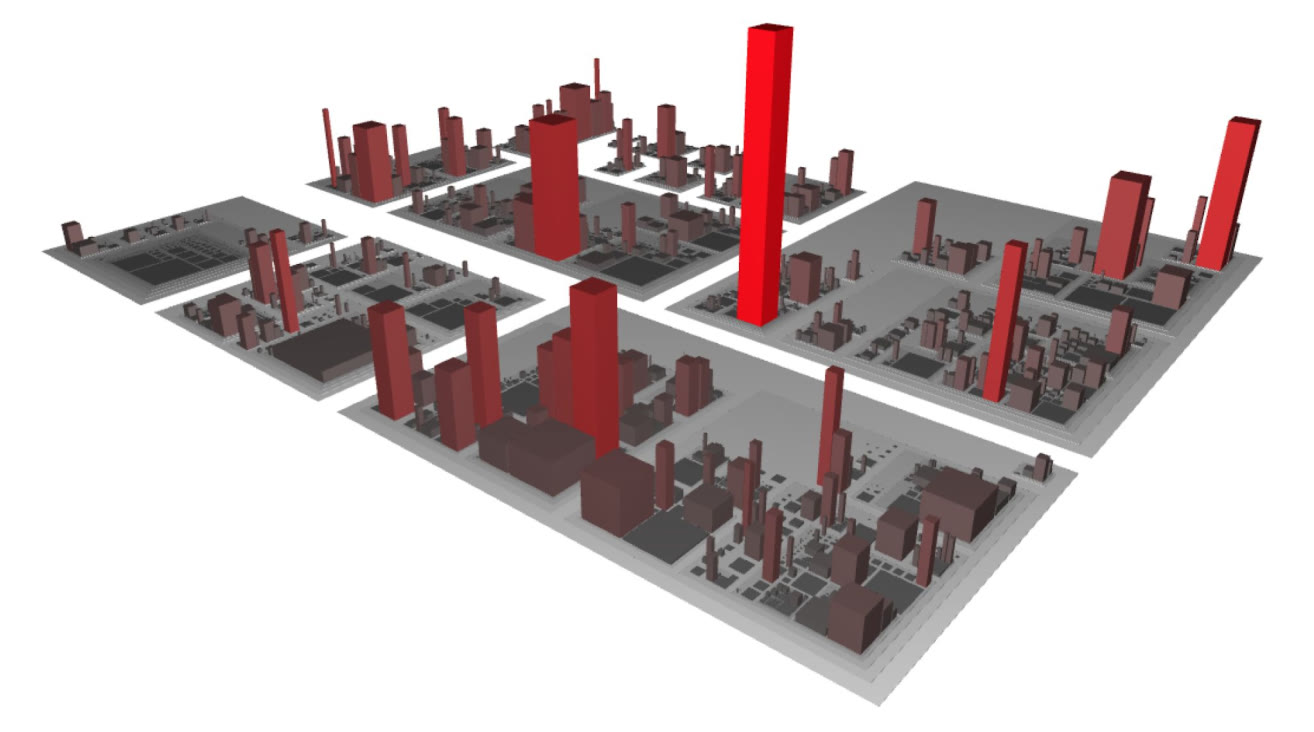
Where should I focus? The tall, bright red buildings are big classes that change all the time.
It works with many languages through parsers and plugins. I’ve used it with Java, C#, and VB.NET, and there are plugins for C and C++. SonarQube also has a plugin that does something similar. Even if your language isn’t supported, it can build the city from folders and files and their size, and you lose only the metadata it can’t extract.
For knowledge silos there’s Gource, which works with Git, Mercurial, and others. It shows your folders as a tree and the people who worked on each part buzzing around it over time. It’s quite hypnotic, which makes for great videos, and there are other ways to visualize this that are more interactive. What matters is that you can spot the module that only two people in the company ever worked on, one of whom has already left. You’re still in time. The bad moment is when both have left, or when you’re the one left behind.
Collective ownership
Someone asked what to look at if you lead a team and need to check that people are doing their work well, with the bus factor in mind.
First: if you need to watch your team too much, maybe the solution isn’t more watching. Maybe the problem is the team’s maturity, and that’s what you should tackle. Beyond that, I think collective code ownership matters a lot. The agreements about what our code should look like stop being one person’s responsibility and become the team’s. You’re not the only one who has to care.
Tools help. SonarQube is free, with some paid modules. It takes your code coverage reports, which tell you which parts of your production code your automated tests went through, and makes them easy to analyze. You can discover that the payment gateway module has no test checking whether it works. Or you look at a team that receives many incidents and find out it’s losing coverage because it isn’t writing the right tests, or that it’s simply a few people with too much work. Coverage is a metric, so take it with care; the brain is still ours.
SonarQube also analyzes your code and flags bad practices. Be careful with that too: it has thousands of rules, each with its own context, and many won’t apply to your project.
Name things after the business
To sum up: pay attention to your structure, your API, your code, your data, your monitoring, and your history. If I had to pick one to leave for last, it would be the history. It’s very useful in large projects, but look forward before you look back.
Above all, take care of naming in every part of your application, and make it speak the language of the business. It sounds silly and obvious, but it’s one of the things I find most often: names that have nothing to do with the business, that talk to me about factories, handlers, and services, while the business is nowhere to be seen. And in the end, the business is what feeds us.