This post is based on my talk “Mide más y sufre menos” (in Spanish), which I gave at Software Crafters Barcelona 2018. The recording is on Beyond Tech Notes.
This isn’t a post about KPIs or financial decisions. It’s about the decisions we make every day in development, and about backing them with some data instead of “I think we should do this”.
A disclaimer first: I’m no data expert. Every time I write a SQL join I end up searching for those Venn diagrams that explain them. Whatever I tell you here, most of you can do far more with data than I do. Nothing here needs heavy data work, either.
The examples come from three places: things I did in the past, things I’m doing now, and things I want to do but haven’t validated yet. I’ll say which is which.
16 milliseconds
I’ve always been interested in game development. I study it a lot and build very little. At a game developers’ event, Javier Cantón told me a story that’s a good way into this topic.
Every game, simple or complex, does some setup when it starts, creates its world or level, and then enters the game loop. In a simple version of the loop, each frame the game:
- Reads the input: keys the player pressed, events from the server.
- Updates the world based on that input.
- Renders the frame and sends whatever output it has to, for example to the server.
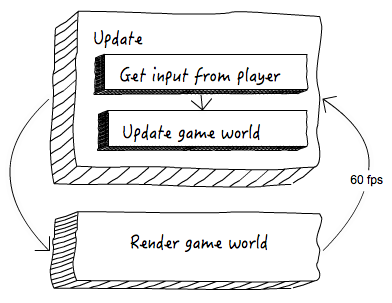
The game loop, from Mozilla’s HTML5 games workshop.
How many frames per second you need depends on the game. A 2D game, a 3D game, and a 3D game for VR are different things, but if the frame rate drops too much, the experience gets very bad. For 60 frames per second, the game has about 16 milliseconds to run the whole loop. VR recommends 90 frames per second, which leaves about 11 milliseconds.
That limit shapes the architecture, the technologies the studio uses, and even business decisions. In big studios with hundreds of people, teams get a share of the milliseconds in the frame. I picture three developers fighting over one more millisecond for their part of the loop. That sounds rough, but they are basing their decisions on a reference, on a metric.
Most of the time, we don’t have even that. Our reference doesn’t have to be performance. It can be economic, or anything else that fits the decision we’re trying to make. Yet we usually decide based on feelings, perceptions, and emotions, and we rarely try to let data guide us.
I’m not saying we should decide everything with strict rigor. That has its own problems, which I’ll get to at the end.
Three questions
Think of the TDD cycle. The red test states a hypothesis about what our code should do, the green validates it, and the refactor (the step we like to skip) is when we look after the code. The cycle also gives our work a structure: in each step we focus on some concerns and leave the rest for later.
Data-driven decisions have a much wider scope than a test, from performance to whether to move a feature forward. A lot depends on context: the kind of product, the business, and the phase it’s in. Validating hypotheses isn’t the same as trying to cut the cloud bill so you can start making money. Even so, I’d propose a simple formula that you can complicate or adapt however you like:
- What am I trying to improve or avoid? It’s an easy question, and we don’t always ask it. Sometimes we feel or sense that something is wrong and start changing things without being clear about the result we want.
- How can I measure it? “It seems faster.” “On my machine it’s fine.” That’s not measuring. Choose the metrics, how to collect them, and how much weight each one gets.
- How can I solve it? State a hypothesis about how to improve what you named in the first question.
Then apply it, measure again, and question what you’re doing if you need to.
It sounds obvious, and it is. But we talk all the time about making things explicit, and here we usually don’t.
Choose your weapons
The tools depend on what you want to measure. Answering a performance question isn’t the same as answering one about infrastructure, costs, or business growth. For profiling, depending on your language, you might use flame graphs. To measure the performance of code, we use BenchmarkDotNet. For web requests, MiniProfiler is handy.
Most of my examples use Grafana and Prometheus. Grafana gives you visualizations and alerts, and it helps you understand the data. Prometheus does monitoring and time series, and gives you better alerts. There are good collections of Prometheus query examples, and SoundCloud wrote about how they monitor with it.
It’s worth stopping to think before picking a tool. If you get the measuring or the visualization tool wrong, you’ll be fumbling around in the dark.
Mark your deployments
Around 2010 I worked on the platform behind the Spanish Gran Hermano (Big Brother): publishing and serving content, polls, votes, contests, and castings. I admit that was the only year I paid any attention to the show, but behind the scenes it was a lot of fun: performance problems, blue-green deployments at a time when I’m not sure Martin Fowler had written about them yet, and plenty of odd challenges.
It was one of the first times I felt pushed to say “my intuition isn’t enough”. To be confident, I had to measure more. I didn’t keep a single screenshot, so I’ll just tell you what we did.
We deployed several times a day, and the show was chaos. A few times we had to deploy to production in the middle of the live broadcast, because the host had announced a poll that wasn’t even built yet and they’d told us a few minutes earlier. At that point blue-green deployments are the least of it. You need to react to whatever problem you might have just introduced.
So we monitored all our systems and marked every deployment with a vertical line on the graphs. I’m not talking about alerts, just plain monitoring. After a deployment you could see at a glance that MongoDB had more connections, or one collection was getting more queries, or response times had gone up. Having a deployment to correlate it with changes everything. Maybe it’s a coincidence, but it’s worth a look.
Something that silly helped us a lot, and I still find many places, my own house included, that don’t do it. It also works as a communication tool for the whole team: “look, there was a deployment here, and the logs grew from that moment on”. We’d messed up, but performance hadn’t degraded enough for users to notice yet. We’d seen it first. That margin lets you be proactive instead of reactive.
Grafana calls these marks annotations. An annotation can be a line or a time window, and it doesn’t have to be a deployment. It can be any important event: an infrastructure change, a poll opening, a marketing campaign. Sometimes you can mark it in advance, and sometimes you can’t.
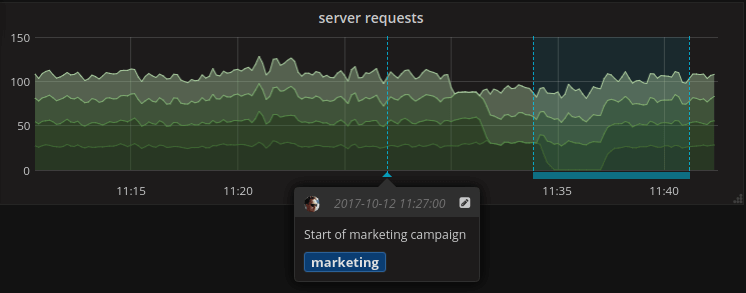
A Grafana annotation: the start of a marketing campaign, right on the request graph.
Our biggest traffic peak in that whole time was completely unexpected. You won’t guess the cause: a contestant who was in Brazil got a haircut, and the news went up on the website. It’s an absurd example from an absurd site, but I’m sure the same kind of thing happens to you in production. Being able to tell whether a spike is related to a deployment or a campaign gives you a direction to look in. When it isn’t related to anything you know, it tells you to search wider.
Sometimes performance matters
On that same project we served something like 50 million page views a month with two dual-core machines. When you have to be that careful, or when you’re making a game, details matter. With BenchmarkDotNet you can compare, for example, calling a method on a class with calling it through an interface. I wrote about how much a method call costs with exactly that kind of measurement. You won’t do this all over your code, but sometimes it’s what you need.
Whatever tool you use, don’t measure performance by writing down the time at the start and the end of a test. That has no rigor at all. Tools like BenchmarkDotNet clean up between runs so the garbage collector doesn’t skew the results, warm up the code, and run the cases in different orders to avoid caching and compilation effects. They know the platform and try to make each measurement as precise as possible, so the data is good for something.
Visualize the hell
A lot of the time, what matters most about the data is how we use it. Sometimes that’s a visualization, sometimes an alert, and sometimes we look at the data ourselves and let our brain interpret it. Not everything needs a machine to tell us what to do.
These days it’s common to have lots of services, sometimes an explosion of them, talking to each other directly or through a queue or a message bus. The system grows fast, someone else touches part of it, and you lose track of what’s going on: how much traffic moves between services, and how they really communicate.
Some tools draw that map for you from live traffic, which gives you a picture of how the system actually behaves instead of a static diagram. The one I showed in the talk was AppDynamics, but there are so many now that it’s hard to believe you picked the right one. If it solves your problem, you did.
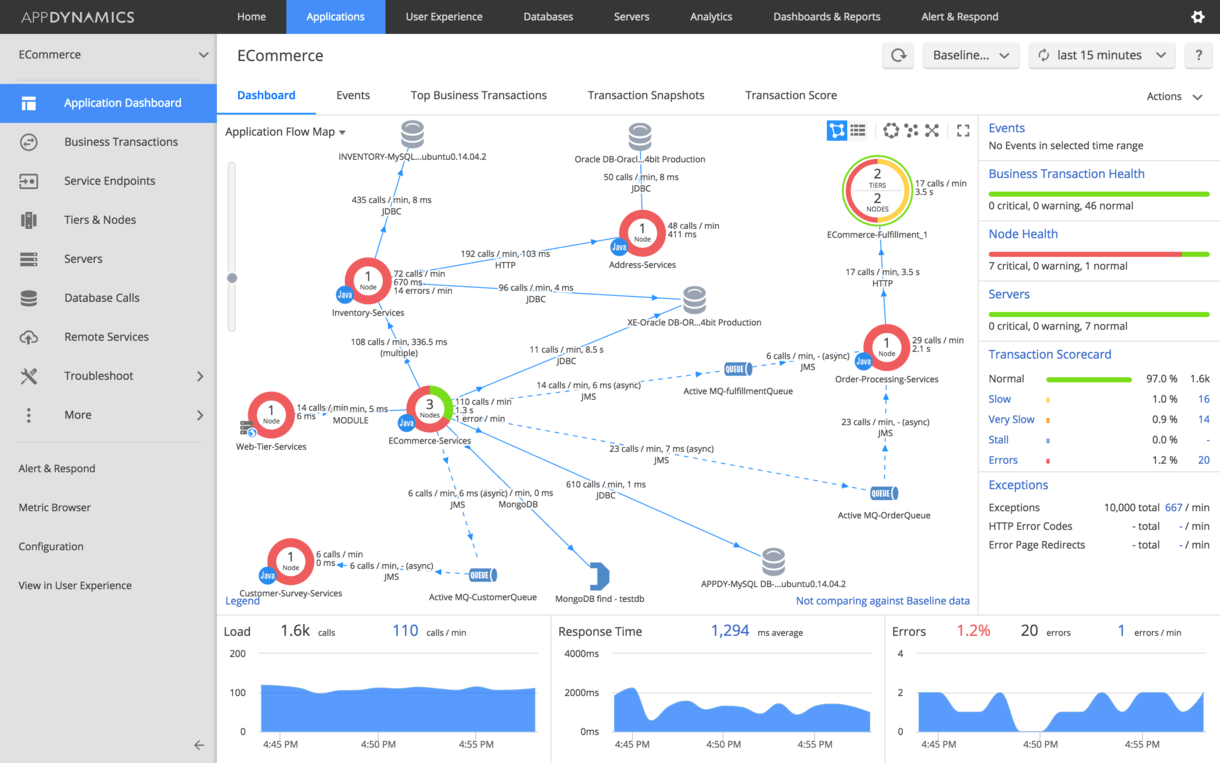
An application flow map in AppDynamics.
Looking at that map you might find two services you built separately that always deploy together, talk to each other constantly, are worked on by the same people, and even share persistence. Their life cycle is the same, so the split was premature.
Give some love to legacy code
So far it’s all been about instrumenting and monitoring systems, which is the obvious part. But there’s more.
We have a product that’s more than ten years old, a good example of legacy code. Customers still use it and ask for it. We even have new installations. But it doesn’t grow anymore: new features go into other products that orbit around it. I’m not even sure I could quote a code coverage figure, since you need automated tests for that. Writing the kind of tests we write for new code is too complex and too expensive there, so our only tests click through the UI end to end to check that the system works as it should.
We still fix bugs in it, which is hard even psychologically. You don’t want to keep working on it, because the new work happens elsewhere, but you can’t leave it alone either, because it has users and keeps giving you trouble.
A lot of its business logic lives in stored procedures. Thousands of them. You can’t say “let’s give this project some love” and go through the list one by one, deciding what to do with each. It’s working. Some users complain, others don’t, and if it works it doesn’t always make sense to touch it.
We haven’t started yet, we’re still deciding exactly which metrics we want, but here’s the plan. Every change, including the ones to stored procedures, goes through code migrations, so our Git history holds every change to the software, as it should. With something as simple as git log we can list the stored procedures that changed most in the last month, three months, or six months.
In a system that gets no new features, a changed file means there was a bug and someone had to go and fix it. So instead of going through them in alphabetical order, we start with the ones giving us the most trouble. There are much more advanced tools, like CodeCity, but you don’t need them. The output of git log and any simple tool to import it is enough, and you could even draw the chart by hand.
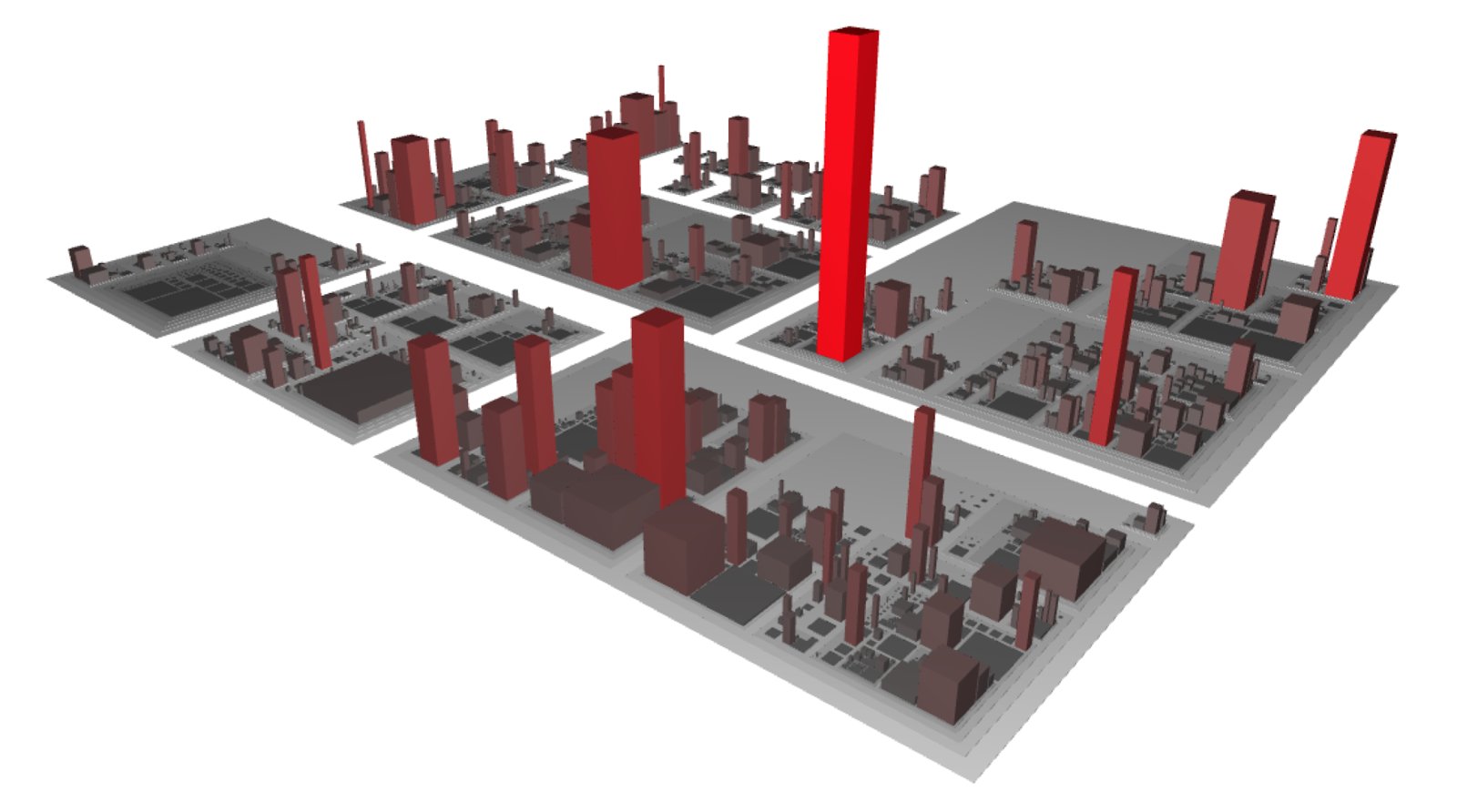
CodeCity draws a code base as a city. Nice, but git log is enough to find the hot spots.
It sounds trivial, but it sets the direction for months of work on that part of the application, and that has a direct economic impact. It bugs me that we didn’t think of it sooner.
56
We’re not the typical cloud product where you sign up and get a tenant. We’re multi-tenant, but we install our product in several environments across several countries.
Our end users asked a lot for documentation, so every user story ships with its documentation, and they can read about each new feature. That costs a lot when you deploy several times a month, let alone several times a day. We were discussing how to make the documentation more attractive, and whether to slow down that flow and update it once a month instead of with every deployment.
Then someone asked: the documentation is a website, has anyone looked at its Google Analytics?
- That’s how many page views the documentation had in the last year.
I can’t think of better data for that decision. Maybe not to get rid of the documentation, but certainly to rethink how we were doing something that expensive. We’d been getting carried away with static generation, translation processes, and more, and nobody was reading any of it. All that money was going down the drain.
You don’t have to write heavy scripts for this, and you won’t feel like a hacker doing it. You open Google Analytics. These examples interest me because they’re so easy. You just have to think of them and pay attention.
You can also bring data like this into your dashboards with custom or modified exporters: Google Analytics, SQL Server, domain events, or anything similar.
Measure your pipeline
We all have continuous integration, continuous deployment, continuous everything. But sometimes things get complicated. We deploy a lot on premises, and our flows are probably more complicated than they should be.
Deploying desktop applications gets very complicated. On the web, all you need is a browser on the client. With desktop applications you deal with operating system versions and patches, which version of the .NET Framework is installed, whether the machine is virtualized, and so on.
Our process for building a package ready to deploy took about two hours. With the three questions it was simple:
- What do I want to improve? The time it takes to get a package ready to deploy.
- How do I measure it? I can measure the total, but I can’t make decisions with that. So we measured each stage of the process separately, with a timeline view of each stage in Jenkins.
- How do I solve it? By looking at the stages that take the longest.
We went from about two hours to well under one. Measuring each stage also showed us that one step related to translations takes more than half an hour. We haven’t changed it yet, but we could build that package outside the continuous integration flow and save another twenty-odd minutes. All of that just from looking where we actually had to look.
Observe your production environments
Beyond graphs, Grafana has panels that help you see the state of your environments at a glance: status dots, diagrams that color each part of your system with live data, and a world map for installations spread across countries.
Avoid cloud surprises
Has anyone been surprised by their cloud provider’s bill? Have you considered that your providers have APIs to tell you how much you’re spending, and that you can put that into your dashboards? If you have money to spare and you’re validating your idea, maybe it doesn’t matter, but that’s not always the case.
Putting spending data from Amazon, Azure, Google Cloud, or whoever into your dashboards, or even your alerts, will save you more than one headache. And it’s rarely done. Grafana has an AWS billing dashboard that shows what each service costs (EC2, S3, data transfer) and can monitor Azure services. Once the data is there, you can alert on it.
Combine it with deployment annotations, and you can see that traffic costs went up since the last deployment and ask whether you expected that.
Embrace mixed dashboards
That gets even better with mixed dashboards. I’m not sure there’s a name for this, so that’s what I call them. We tend to put infrastructure data on our dashboards: CPU, RAM, API requests. Have you considered putting business data next to it?
Say your dashboard shows that since the last deployment your Amazon costs went up, but your business volume didn’t. Technically you might not care. We should care, because we’re here for the business.
We talk a lot about domain events, even if we don’t always use them. That information is very useful here. If after a deployment you see a 15, 20, or 50 percent increase in resource use, but the number of real domain events hasn’t grown, what kind of deployment did you just make? Maybe you didn’t add technical debt, but you’re definitely adding economic debt.
Collecting that data is easy. The hard part is having a system that publishes domain events and getting that information out of it. Grafana and Prometheus make the rest very simple. We have mixed environments, cloud and on premises, and containers not yet in production, and we can get that data out of any of them. It shows.
Warning!
Avoid data porn
Having a huge screen or three in the office looks great. Someone from the business side walks by and says “wow, look at that”. But it can be empty information that only looks good. It’s only worth it if it reflects information that helps you decide, or if you glance at it on your way to get coffee and see a spike you can’t explain. If you always walk past without looking, it’s useless, like the red builds in Jenkins we’ve learned to ignore.
Correlation is not causation
There’s an old chart showing that Internet Explorer’s market share and the murder rate in the US went down together. Clearly correlation, not causation. Now, if it plotted Internet Explorer against web designers’ suicides, that one I could believe.
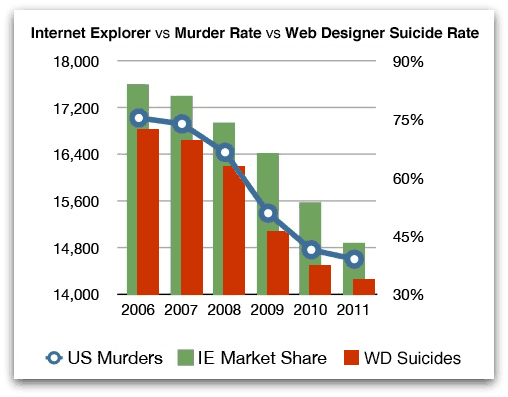
Internet Explorer’s market share, US murders, and, for good measure, web designer suicides.
Not a paper, just a little more rigor
I can think of many more examples. My suggestion: every time you make a decision, notice whether it comes from a feeling. If your argument starts with “it seems to me”, give it another turn. You might find something with a bit more rigor. I’m not talking about writing a paper about how I base my decisions on data.
It also makes conversations with the business much easier, because you can justify why you did something in terms they care about. If at least part of your dashboard matters to the business, even better, because you can talk about the economic impact of a feature. “You want this in real time? This is what it would cost, not just to build it but in infrastructure. Do you think the feature will bring in all that money?”
Data makes those conversations easier. With other teams, with colleagues, and with the business. But above all with ourselves, and for me that’s where most of the value is.