This post is based on my talk “Jardineros, artesanos o ingenieros… pero no juglares” (in Spanish). I gave it at Pamplona Software Crafters 2019 and again at Commit Conf 2019, where I stood in for a speaker who couldn’t make it. Both recordings are on Beyond Tech Notes: Pamplona and Commit Conf.
Our profession loves metaphors, and we pick them badly most of the time. Some people say we’re craftspeople, some think we’re engineers, and I like to talk about gardening. One day, talking with Jorge Barroso, the word minstrels came up. I liked it, and it fit perfectly as clickbait for a talk title. I copied it from him, and I’m sure he copied it from someone else, so I don’t feel too guilty.
Minstrels and troubadours

When we think of minstrels, we picture someone going from village to village entertaining people, a bit of a clown. But in the Middle Ages minstrels did something much more important: they spread culture. They carried music and poetry, news, social events, and personal stories to people who couldn’t read. Written language belonged to nobles, monks, and a few educated people. For everyone else, if you didn’t happen to chat with a traveling merchant at the tavern, the minstrel was your source of news.
And if you’re going to borrow a metaphor, you should read up on it a little. Minstrels mostly didn’t create anything. They were usually poor, learned to play an instrument by trial and error, and at most adapted what they performed. The creators were the troubadours: poets and composers, usually of high birth, who wrote the works that minstrels then carried around. A troubadour wasn’t going to leave the court to tour villages.
Stretch the metaphor a bit further and it fits our industry far too well: minstrels are to developers what troubadours are to architects. Junior minstrels, senior minstrels, junior troubadours, senior troubadours.
How often does knowledge about your project travel exactly like that? A new person joins and gets told “sit next to this one for a while, they’ll tell you how things work”. You move to another project where things are done almost the same way, but not quite, and you find out the differences from that project’s minstrel. What do they tell you? The decisions that the troubadour, the architect, made at some point. Then the minstrel sings of the epic battle in which they slew the Jenkins dragon and got the release into production.
Conferences work this way too. We meet in the village square and pass on our experiences by word of mouth. That’s fine: a conference is ephemeral, and there we can afford to be minstrels and troubadours. In our daily work we can’t. Just as we say we don’t want heroes on a project, we shouldn’t want minstrels or troubadours either. Where will that minstrel be next time you need their story? With luck, on another project in your company. Without luck, gone.
Heroic tales work for a while, but they don’t scale. Once a company grows, encourages rotation between teams, and hires people with very different levels and backgrounds, you can’t depend on heroes, minstrels, or troubadours anymore.
Your context, your rules
What follows are techniques that are working for us. Every company, project, and team is its own world, with different levels, needs, and problems. Some of this may work for you as it is, some may need adapting, and some may make no sense in your context. Run it through that filter.
Our context, so you can judge: I work at AIDA, building products for the mobility sector for Grupo Domingo Alonso. Four years ago we had a single product that was already eleven years old, a serious legacy system: around 8,000 stored procedures and two million lines of T-SQL. Now we have eight or nine products. We went from hiring one person every two years to hiring five or ten in a few months, to the point where we had to slow down hiring because we couldn’t make new people productive fast enough. That’s when we noticed how much we depended on minstrel knowledge. Nobody leaves and nobody joins, so the problem had stayed hidden for years.
The problem
Picture the graph of branches in a Git repository. Now imagine each dot isn’t a commit but a piece of knowledge, and each line a person who joins, does some work, leaves, or comes back. That’s the timeline of any team.
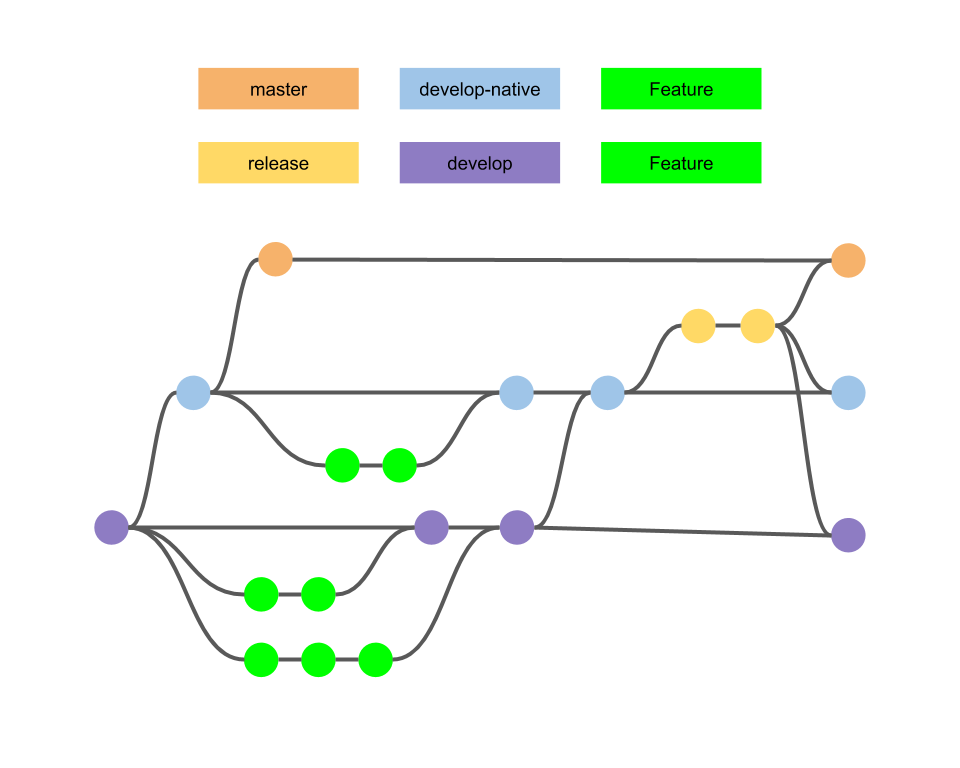
Read every dot as a piece of knowledge, not a commit.
We like to say that a team is immutable: if someone joins or leaves, it’s a different team. True, and quite poetic, but it goes much further. Nobody has to join or leave. After a single pair programming session, two people know things the rest of the team doesn’t. They may have made decisions about the design or the architecture, about how to approach a problem, or even about the business, because a question came up and they asked the product owner.
So we live under an illusion that everyone shares the same knowledge. A new person may know the language and the tools we use, but that doesn’t mean they use them the way we do or share our workflow. Assuming all of this gets absorbed by osmosis causes a lot of pain, for the company and, beyond money, for the developers themselves.
What isn’t the solution
The industry has tried to solve this for years. UML was one of those attempts, and the problem I see with it is that it came from troubadours: it was a way to hand sheet music and verses to minstrels. We don’t need minstrels who don’t think and who, at most, adjust a stanza because they can’t quite play the lute.
I’m not going to demonize UML. It’s a tool, like a knife. I find sequence diagrams useful in certain scenarios and I don’t feel dirty using them. But as information it’s poor, it isn’t intuitive, and you have to learn a very technical language. It doesn’t enable what we actually want, which is to sit down with the business, with design, and with UX and talk about the same thing.
A 500-page document isn’t the solution either. Nor is asking the person who joins your team to remember everything you do, and how, during their first week.
Remember the right-hand side
Let’s go back to the Agile Manifesto. No need to light a candle for it. Two of its values matter here:
- Individuals and interactions over processes and tools.
- Working software over comprehensive documentation.
And the sentence that follows: while there is value in the items on the right, we value the items on the left more. I don’t know how the human brain works, but since the left side is in bold, we seem to have forgotten that the right side has value too. We’ve developed an allergy to anything that smells of documentation, process, or tools.
Who doesn’t use a tool and a minimal process to track their work and coordinate with their teammates? If you work remotely, you need asynchronous communication. If everything depended on individuals and interactions, we’d spend all day in meetings, and nobody wants that. So we buy the left side, but we don’t throw away the right one. We want it in the right measure, without burying ourselves in documents.
A team activity
Software development is a team activity. We’ve said we don’t want the cowboy hero, and the team isn’t just the people who write the code. It’s also an activity built on knowledge, and not mainly knowledge of the programming language. Rafael Luque likes to say that our work requires a lot of context, and he’s right. That context has to be explored in each company and its circumstances.
When someone joins, you want them contributing as soon as possible. Even if your startup can afford to hire only very experienced people, many companies can’t, or don’t want to, staff every team entirely at the highest level. What do you do with those people, give them the scraps? You want them as effective as everyone else and growing until they catch up, overtake the rest, or leave because your company is toxic.
Structure and communication
There’s a well-known parody of the org charts of Amazon, Google, Apple, Facebook, Microsoft, and Oracle. Like all good jokes it has some truth: your structure determines and limits how you communicate, how you make decisions, and how knowledge flows. And as Conway’s law reminds us, if you ask an organization with three teams to build a compiler, you’ll get a three-pass compiler.
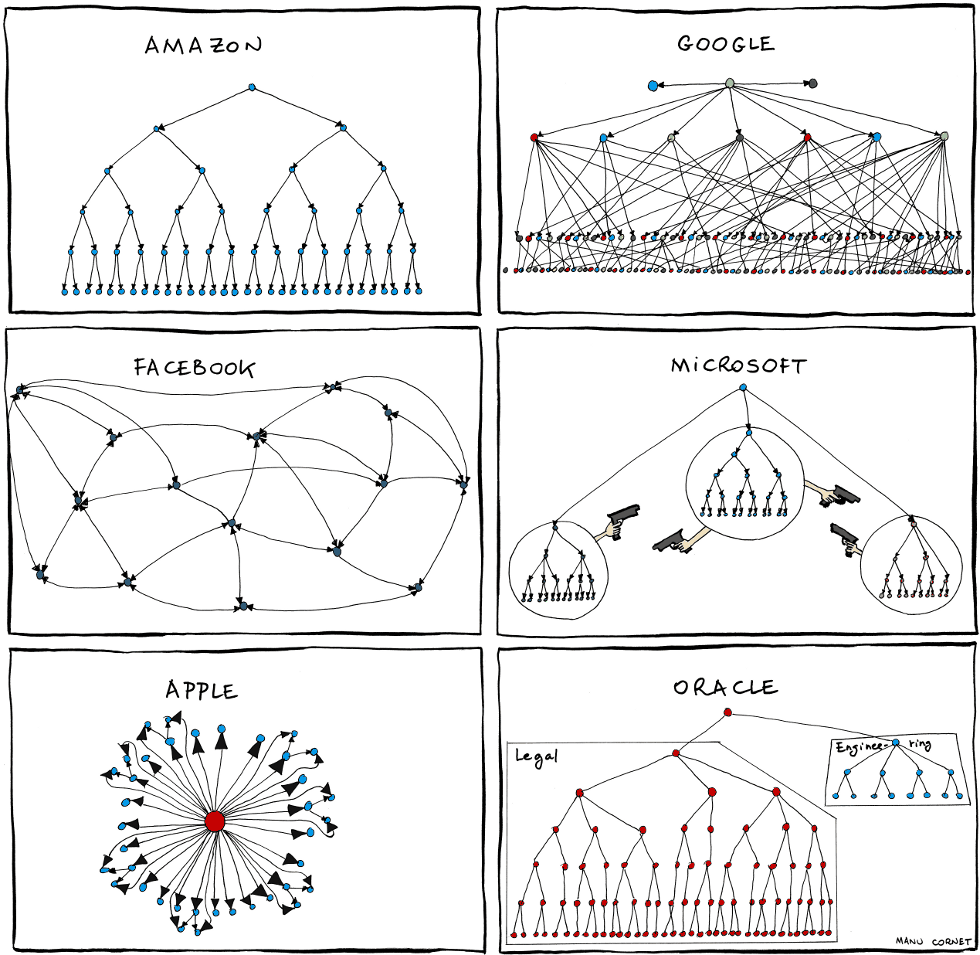
Organizational charts, by Manu Cornet (2011).
We had a peculiar situation. Many years of legacy, and a structure that hadn’t changed in years. Luckily a very flat one, but with very specific communication habits, and the software mirrored it: there was a sales team, a pre-sales team, and a workshop team, so there was a sales module, a pre-sales module, and a workshop module, with knowledge silos in each.
What happened next is something we still suffer from. The structure no longer just shaped the software. The software was big enough that, when we wanted to change the structure of the company and of the product, it held us back. Then people go to conferences and hear about microservices, a database per service, and all those very reasonable techniques, and you realize the gap between where you are and where you’d like to be is so big you don’t even know where to start.
Find your weak spots
So where do you start? The problem shows up everywhere knowledge is created: onboarding, your workflow, incident handling, retrospectives, decisions about architecture or customers. Go through every part of your daily work where knowledge is generated, ask what matters for someone to get started and later do their job well, and decide consciously what to do with it.
I like to ask: what would happen if a new person joined my team tomorrow? Whatever their experience. Someone senior may have a lot to unlearn: maybe they split user stories differently, or estimate where you don’t, or come from object orientation into a functional codebase, from static to dynamic typing, from .NET to Java. Thinking through that whole journey exposes nearly every gap in how you work. But you don’t want to wait for someone to join so they can tell you where it hurt.
The usual way to choose what to fix is to listen to whoever complains the loudest. That doesn’t work well. If you’re the one making decisions and something hurts you, you’ll think it’s the most important thing because it’s yours. And in big systems some parts don’t even have logging, so nobody complains about them.
What worked for us is the Software Delivery Assessment by Matthew Skelton. It isn’t even code: it’s a repository of Markdown documents with a questionnaire for each of these areas:
- Team health
- Deployment
- Flow
- Continuous delivery
- Operability
- Testing and testability
The questions are things like how easy it is to release a new version or how good your technical quality is, and some are very specific to code. A separate document explains each question and describes what a 1 and a 5 look like, so you have a reference to score against. You can trust that scale or apply your own, but it’s a good starting point. For each area you write down a rating, a trend (improving, stuck, or getting worse), and possible actions.
It works as a retrospective-style session. They recommend running it roughly every three months, and it takes about two hours. It goes deep enough to diagnose without becoming yet another endless survey. Since the original is designed almost to be printed, we moved the questions to a Google Sheet. Each person fills it in individually during the session, and the data accumulates so you can see the trends.
A few lessons:
- It involves the whole team. One person can fill it in, the whole team, or several teams. Teams aren’t competing, please.
- The rating isn’t what matters. It’s an indicator of where to focus. If everything is bad, that’s fine.
- Focus on trends and actions. If you’ve had three sessions in a row going downhill on something, look at it, and push yourselves to come up with actions.
- It’s your context, your rules. If you’re missing a question, fork the repository and add it. If you think it’s great, send a pull request.
On its own it doesn’t fix anything. It makes problems visible, which we usually think we already have but don’t. It also shows you areas you thought were terrible but that can wait, because something else should come first.
A knowledge corpus
Do you have an inventory of all the knowledge in your company? We don’t, and we don’t try to. Unless you have a team of librarians, nobody can: we generate knowledge faster than we could document it at an economically viable cost. Our job is to deliver value, not to produce documents.
But do you know what a developer needs to do their daily work? When someone joins, all you have is their CV and whatever hiring test you ran, which says very little about the depth of what they know. We work in .NET, but we don’t do everything the way Microsoft says. We try to apply DDD, adapted, not because we’re cool but because we adapt it to the skills we have right now. Teams are heterogeneous, and we have to work with that.
Codurance has an apprenticeship program with the apprentice’s first weeks documented, and it focuses on techniques rather than tools. We liked the idea. So we’re building a knowledge corpus: a repository of Markdown documents with a table of contents that we fill in little by little. Some rules we follow:
- It can’t be a list of books. It’s the articles that reflect how we think as a company, the katas that help you go deeper or practice, the material that bridges the gaps we see again and again when people join.
- Techniques over tools. We pair by default (not always, but by default) and put a lot of emphasis on design and object orientation. That matters more than any framework.
- But don’t ignore tools. You’ll need to learn Git anyway.
- Don’t think only of new people. We had the same gaps among people who had been there for years. We assumed pairing would spread everything, but deliberate learning doesn’t happen while you’re pushing a user story forward. It happens when the goal of the session is a kata or a learning exercise. Rotation needs it too: we have everything from a Visual Basic .NET Windows Forms desktop app (the one that pays the bills) to things in React, Angular, and Vue. Someone who has used React but never Vue needs to know how we use Vue.
- Don’t stop at the basics.
The catch is that this takes a lot of time and effort. In our case it means taking people off delivering value on a product so they can think about onboarding.
Never underestimate a README
This is the easy one, nothing new under the sun, and still we kept finding projects with an empty README. Anyone in our company should be able to clone a repository, follow the README, and have everything working. We haven’t reached that everywhere, but we have in most projects.
It even caused some tension. People who had been on a team for years said: why waste time on this, I already have it set up on my machine? It’s the same argument as testing after the fact: why write the test, I just tried it and it works.
Now we simulate onboarding. Every so often we pretend someone is joining a project and walk through it: they’d have to get it running, they follow the README, it doesn’t work, we update it. That step hurt a lot? Let’s automate it. It’s cheap and it makes us question how we work. So go to your repositories and check: in how many does following the README actually work, and how many people will suffer tomorrow because it doesn’t?
Runbooks
Runbooks are the cool name for cheat sheets. They tell you how to operate your system, so that someone who isn’t in its daily work can still deal with it, in an emergency or not. And please automate them. If you can’t yet, start without automation, but the run part means they can be executed.
They weren’t something we missed until our user base tripled in a year, with some users on another continent, in time zones that made no sense for our working hours. Suddenly you’re asking how you respond to incidents, and whether you need a developer from the team on call at all times. Then there’s the person on holiday, and the silly problem someone fixed in ten minutes the other day, except that person isn’t around. Please don’t call them. With runbooks, and enough discipline, you can document that fix and even automate it, instead of waiting for the one person who knows how to redeploy a server that went down.
What a runbook should contain depends a lot on your operations. I like the list from Tom Limoncelli, who worked at Google:
- Overview of the architecture
- Build
- Deploy
- Common maintenance tasks
- Pager runbook: which metrics to watch and who to call when they go off
- Disaster recovery
- SLAs
We use the list so we don’t forget anything, but we give some sections far more attention than others, depending on what hurts us right now. With continuous integration and continuous deployment, build and deploy are easy. Disaster recovery and SLAs are harder, simply because we think about them less and they’re further from our daily routine.
Incident reports
Incident reports look like the typical silly idea. Some people even found it pointless: why talk about the problem if it’s already fixed? But think about what usually happens with an urgent production problem on a weekend. The person who knows the most jumps in, fixes it under pressure, and goes home to forget about it. The lessons learned: zero. The actions taken so it doesn’t happen again: zero. It will happen again, and the same person will have to fix it in a hurry, or just smile politely because they no longer work there.
An incident report is lightweight documentation written while you resolve the incident, while the information is still fresh. In our case an incident is anything that interrupts or degrades the system, basically anything that affects the user experience, not every bug. We keep a template in Confluence with five parts:
- Summary
- Timeline
- Cause: what happened and the data you had to diagnose it
- Solution: what you tried and how you fixed it
- Actions
The actions are what make it worth writing. Later, calmly, you ask: if it was hard to diagnose, how do we make it easier? If a user had to tell us, how do we monitor it and raise an alert? Can we write an automated test so the next version doesn’t ship with the problem?
They’re also a source of knowledge. When someone new joins support, the diagnosis section alone helps them with problems that haven’t been fully prevented yet. Be careful how you introduce them, though: they’re a pain to write if people don’t understand their value.
We don’t keep them next to the code. The people who use them most are in support and may not even have access to the repositories, and incident reports often include infrastructure details from specific on-premises installations that you don’t want in a code repository.
ADRs
ADR stands for Architecture Decision Record. The only thing I don’t like is the name, because it suggests they’re only for architecture. For me they should be RDRs, Relevant Decision Records: lightweight documentation for any technical decision with impact, whether you follow it or not. Macro design, micro design, or “this framework has a performance problem under these circumstances, please don’t use this or the whole system falls over”.
We write one whenever a meeting or a pairing session produces a decision relevant enough that the rest of the team should know it. We have company-wide ADRs (for example, how we version APIs) and project-specific ones.
What they solve isn’t so much recording the decision as recording why: the problem, the options we evaluated, and why we discarded the others. We kept hearing “why do we do it this way?”, “no idea”. At best: “So-and-so did it”. So you go to so-and-so, who says it had to do with a conversation with the business they don’t quite remember. What we do in our projects can’t be a matter of faith. Faith is fine for whoever has it, but not in our projects. We need to know why we do things, because we want to be able to question them. Now, when someone joins a project, by hiring or rotation, and asks that question, the answer is: read the ADR, understand the context, and if you have something to add, propose a new one.
Our template has a title, date, status, context, decision, consequences (positive and negative), and the alternatives considered. Search for ADR templates and you’ll find much shorter and much more elaborate ones. Find one that works for you.
What we’ve learned:
- Agree on a format. It doesn’t need to be sophisticated.
- Keep them in the code repository. One Markdown file per ADR in its own folder: versioned with the code, with its history next to it, reviewed through pull requests, and readable in the web UI of Bitbucket or whatever you use. No Word documents, no separate wiki; a wiki was too far from the code for us. Bitbucket’s Markdown preview and text search are all we need.
- Immutable. Once an ADR is accepted, you don’t touch it. Someone may already have read it, and if you change it you’re cheating them.
- Invalidate, link, complement. If a new decision invalidates or complements an old one, write a new ADR and link both ways: this one supersedes that one, that one was superseded by this one. With Markdown links it’s trivial, and it’s much easier to follow which decisions were made.
- Specific. Don’t mix several conversations in one ADR. You won’t be able to invalidate it, you won’t know what a link points to, and you’ll end up mixing the problem with the solution.
- Write fast, then refine. “I’ll write the ADR later” never happens, or happens when the conversation is no longer fresh. Now someone always brings a laptop to the meeting and, as soon as decisions start being made, acts as scribe: a rough draft, without worrying about the template. After the meeting you fix the format, add links, and polish the wording.
- Don’t let the language be a barrier. Not everyone on our teams has enough English to write in real time, and it was dragging us down. So we write them in Spanish. The day this goes international, we’ll pay someone to translate them.
The discipline that matters is tying ADRs to the way you make decisions: anything that pulls them away from it means they’ll be out of date. We also ask people to review the ADRs that have been created, and when one is vitally important we send a message to the team. Sometimes you’ll delete one because it shouldn’t have been documented at all. To start, write ADRs for whatever hurts the most, and you’ll find your own heuristic, like deciding how many integration tests to write.
If you want to see real examples, the Arachne framework has its ADRs public.
If I had to keep only two of these techniques, I’d keep the Software Delivery Assessment and ADRs. For the development team they’re the ones that have had the most impact. But that leaves support out, and there incident reports help a lot.
Event Storming
Event Storming comes from Alberto Brandolini: a huge wall, a roll of paper, and lots of sticky notes. It looks like an agilist gimmick, but it isn’t. It started as a domain modeling session, to find aggregates, domain events, commands, actors, and so on, and it still works for that. Over time it has been used for much more:
- Modeling the domain
- Modeling processes
- Documenting
- Exploring an unknown domain, or teaching someone a known one
- Debating: having a conversation about a process by drawing it as an event storm instead of a sequence diagram
Funnily enough, modeling the domain is what we use it for least. Where it helps us most is in conversations with the business, with UI people, and with developers, at the same level of abstraction and in a language everyone understands. And when someone joins the team and asks how a process works in your product (the typical shopping cart, or buying a train ticket), a digital board of it gives them a high-level view they can look at whenever they need. You don’t need it for every process, nobody needs an event storm of the login, but for complex ones it’s very good documentation.
Some things that made it much more useful for us:
- Define the goal of the session.
- Make the legend explicit: which sticky note color means what.
- A command isn’t necessarily a Command. It’s not the Command pattern we’re used to, just something someone asks for.
- An event isn’t necessarily a domain event. If you’re modeling the domain, it makes sense to be strict. If you’re modeling a process, an event is just something that happens; it doesn’t need to exist in your domain or be asynchronous. It might be the next line of code. This was what broke our sessions the most, because it made people feel they needed a lot of expertise to start. Recently someone told me “we aren’t ready to talk about events yet”. Then don’t use it to model the domain; use it as a communication tool.
- Your session, your rules. If you want to change the legend, Brandolini isn’t going to charge you extra.
One twist we like: we link the board to the mockups. In one session for a card game (think Magic), our legend separated commands triggered by the user (blue) from commands triggered as a reaction to an event. When something has an effect on the interface, we place the mockup or screenshot next to it on the board. This closed a big gap we kept having between the process as designed for the software and as designed for the user experience. It even helps people doing testing: “how do I run this process? I even have the screens”.
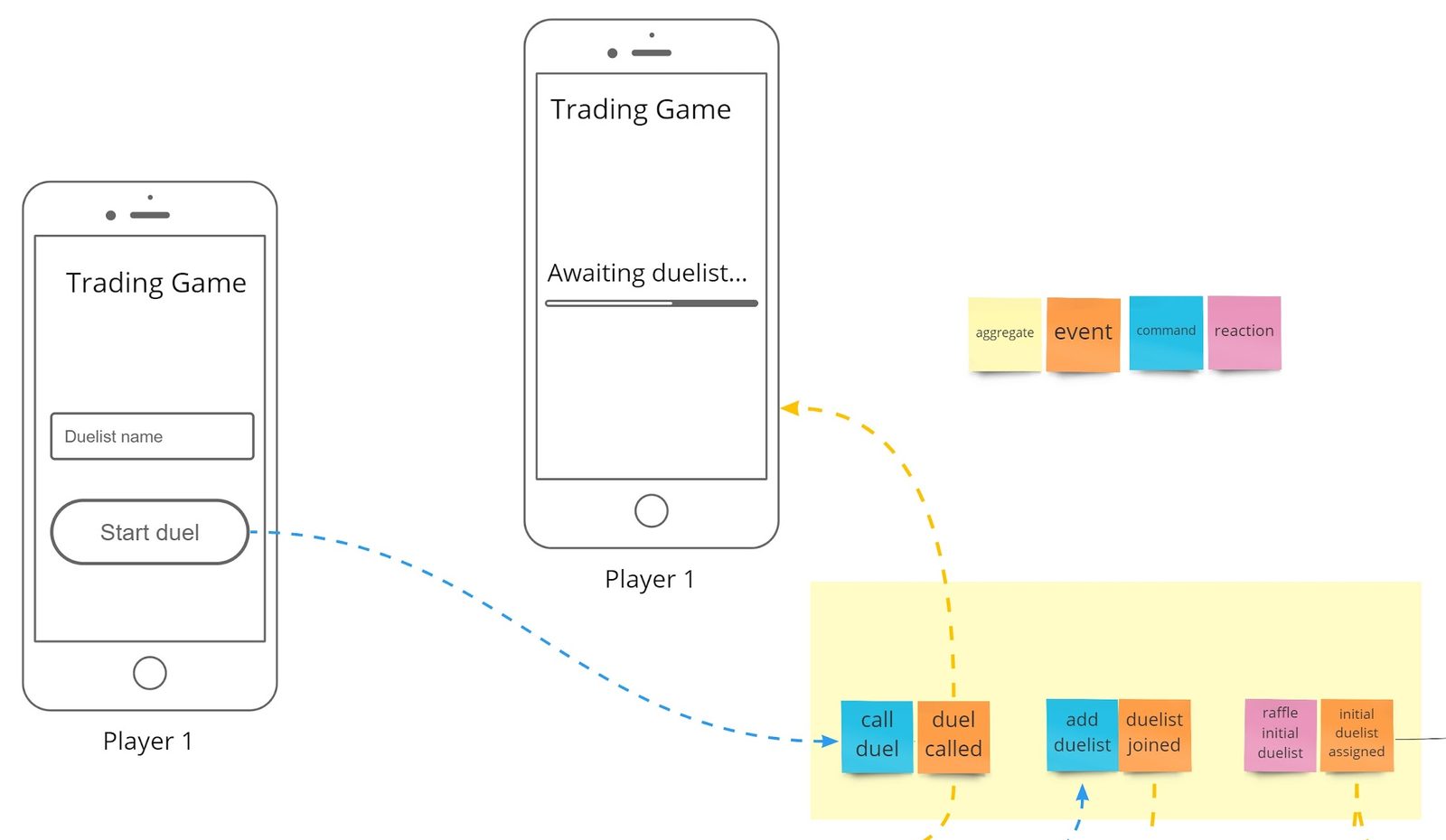
Part of the board: the dashed arrows tie a command or a reaction to the screen it affects.
Brandolini would probably throw us out for this, but we do it in Miro (formerly RealtimeBoard). He says an Event Storming session is like a party, and nobody invites you to a virtual party. But we work remotely a lot, and we want the result as reference material without unrolling the paper again. I’ve written some more tips for an Event Storming session.
That’s a lot of work
So now I have to assess the team, build a knowledge corpus, fix every README, write runbooks, incident reports, and ADRs, and run Event Storming sessions with mockups? And there’s more: customer journeys, the C4 model, Wardley maps, context mapping, one-page designs, TLA+…
Yes, it’s a lot of work. Patience: you don’t get there in a day. You don’t have to start Event Storming with mockups tomorrow, or write down your entire corpus. Introduce things little by little, choosing the ones that apply best to your context. We’re doing it that way, because doing it all at once isn’t economically viable and because these techniques have to be learned too. You decide which processes deserve to be documented to death and which decisions deserve an ADR.
Passive knowledge: extend your tools
Everything so far is active: someone has to write the material and someone has to read it. Only the people involved benefit. But we can also expose ourselves to knowledge passively.
How many of you have worked with Python and followed PEP 8? PEP 8 is a small area of consensus, agreed by the outside world, turned into an automatism. You don’t have to keep checking whether you follow it: you run the check as one more test in your pipeline and you’re done. We can do the same with our own conventions, by writing our own linters, code analyzers, or visualizers. We’re also generating diagrams dynamically from information that no existing tool shows us.
A very silly example: we work in .NET, and there you can call DateTime.Now, which uses your local time zone, or work in UTC. If you’ve never had problems with dates, lucky you. In the back end you need UTC, or you’ll live in a date hell. Someone who just joined may not know it. You can add it to the onboarding docs, sure. But even if you know it, one day you’ll have a bad day: you didn’t sleep, you just became a parent, whatever. You’ll make mistakes, from lack of information or from carelessness.
So we wrote a Visual Studio analyzer that flags DateTime.Now and tells you to use the alternative we agreed on, and it could even link to the ADR that explains why. That saves you a diagnostic hell and a production incident on your bad day.
We always say documentation doesn’t compile. None of the techniques above compile either, and that’s why they go stale. This feedback loop is immediate: you don’t even need to build, deploy, or run the tests. Another one I’ve been looking at but haven’t adopted yet: analyze SQL statements and fail the build if there’s a DELETE without a WHERE. Depending on your tooling, that’s cheap to build. Getting it wrong is very expensive.
Verify your conventions
Whether we talk about hexagonal architecture or layered applications, we set conventions about how to structure the code: domain shouldn’t depend on infrastructure, presentation shouldn’t reach into data access. Libraries like NetArchTest in .NET or ArchUnit in Java let you write those rules as automated tests: “nothing in the presentation layer’s namespace may depend on the data layer”. It runs like any other test, it goes red, and it stops the deployment. Whether your layers are separate assemblies or just namespaces doesn’t matter.
It’s very useful for avoiding accidents, and it’s documentation that compiles. The people who join don’t have to keep every one of those rules in their heads. But be very careful:
- It’s a help, not a corset. It prevents careless mistakes; it shouldn’t stop you from thinking. We don’t use it as rails to tell people what to do.
- Mind the cost/benefit. A Visual Studio plugin isn’t free; in other toolchains this is far cheaper or nearly free. We use them in only three exceptional cases, but those three save us a lot.
Because the risk is obvious: you become the troubadour who puts a battery of tests on the minstrel to make sure they don’t step out of line.
Don’t become a troubadour

That’s the most important part. Sometimes we get carried away and try to turn everything into procedure, telling everyone exactly how to work. The point of all of this is the opposite: to stop depending on minstrels without turning ourselves into troubadours who write the verses for everyone else to sing.